BlogGuide
How to protect a PDF: which method stops what
Passwords, print limits, watermarks, per-person marks and rights management compared: what each one stops, where it fails, and how to combine them.
- Author
- PDF Ghost Team
- Updated
- First published
- Reading time
- 6 min
On this page8 sections
- Five methods, five different jobs
- A password keeps strangers out, not your recipients
- Print and copy restrictions are a request
- A visible name on the page discourages passing it on
- A separate copy for each person tells you whose copy leaked
- Rights management controls the file after you send it
- Combine two or three methods
- What none of these methods can stop
To protect a PDF, pick the method by what you want to stop. A password keeps out people who don't have it. Print and copy restrictions ask the reader's app to behave, and many apps ignore them. A visible name on the page discourages passing it on. And only a separate, marked copy for each person tells you whose copy it was if it leaks anyway. No method stops someone who can read the document from passing on what they see, so most people combine two or three.
Five methods, five different jobs
| What you want | Method | Where it stops |
|---|---|---|
| Keep out people without access | A password to open (AES-256) | Anyone with the password can open the file, save it and pass it on |
| Discourage printing and copying | PDF permissions | Only the reader's app enforces them, and many ignore them |
| Discourage passing it on | A visible watermark with the person's name or email | It can be cropped or edited out, and it doesn't stop a photo |
| Find out whose copy leaked | A hidden ID and a copy code in each person's copy | It doesn't stop the leak; it tells you afterwards whose copy it was |
| Take access back after sending | A rights-management system or data room | Readers need its viewer or a sign-in, and screenshots still work |
Which to use when:
- Sending to one or two people you trust: a password to open, sent separately from the file.
- Sending the same document to many people: a separate marked copy for each, plus a visible watermark if you want to discourage forwarding.
- Documents that get printed or photographed: add the copy code with a QR code, which stays on the paper.
A password keeps strangers out, not your recipients
A password to open encrypts the file. qpdf's guide to PDF encryption recommends 256-bit AES and compares a file encrypted this way with one encrypted by gpg or openssl using the same password. A long, random password is the strong part; a short one can be guessed.
The limit is the people who have the password. Any app that opens the file has the key, so a recipient can save an unlocked copy and pass that on. A password often ends up in the same email as the file, too.
- Send the password through a different channel than the file, for example by text message.
- Give each person their own password. If one leaks, it opens only that person's copy. On Protect a PDF, A different password for each person (AES-256) gives every copy 16 random characters, listed next to each copy and in the recipients CSV.
Print and copy restrictions are a request
A PDF can carry permissions that say "no printing" or "no copying text". The encryption doesn't enforce them: in qpdf's words, they are "solely enforced by the software" that opens the file (qpdf). Any app that can open the file can ignore them. A screenshot or a photo of the screen ignores them anyway.
That's why the option in PDF Ghost is called Ask PDF readers to block printing and copying: it turns printing and copying off in each copy's permissions, as a request, not protection. Screen readers keep working. Use it to make casual copying less convenient, not to keep anything secret.
A visible name on the page discourages passing it on
A watermark that shows who the copy belongs to makes people think twice before forwarding it. Even a masked email such as da***@example.com, the default, tells the reader the copy is theirs; the text can also be the person's name or full email.
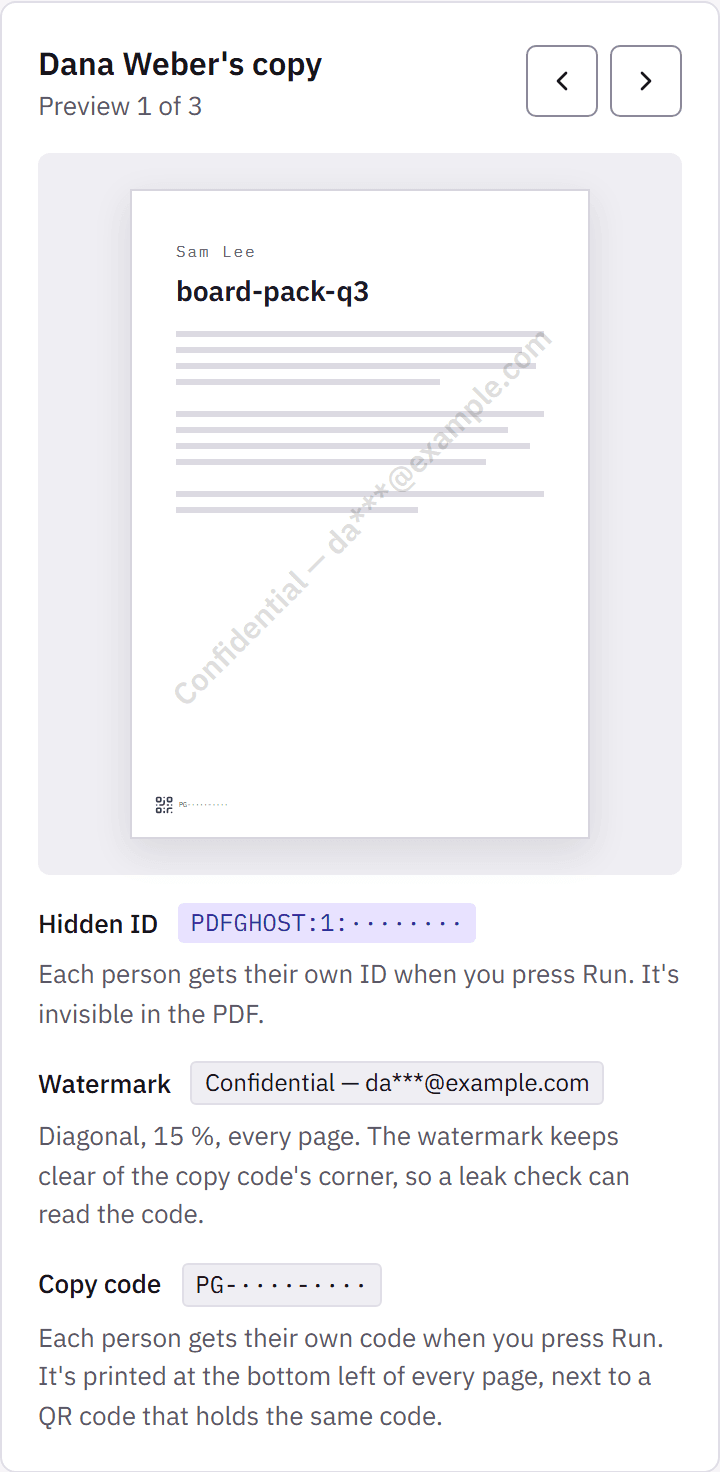
A watermark is easy to see, and so it's easy to remove: crop the page, edit the PDF, or retype the text. That's why it works best together with a mark the reader doesn't see.
A separate copy for each person tells you whose copy leaked
If everyone gets the same file, a leaked copy looks like all the others. If each person gets their own copy with a mark that is theirs, the leaked file says whose copy it came from.
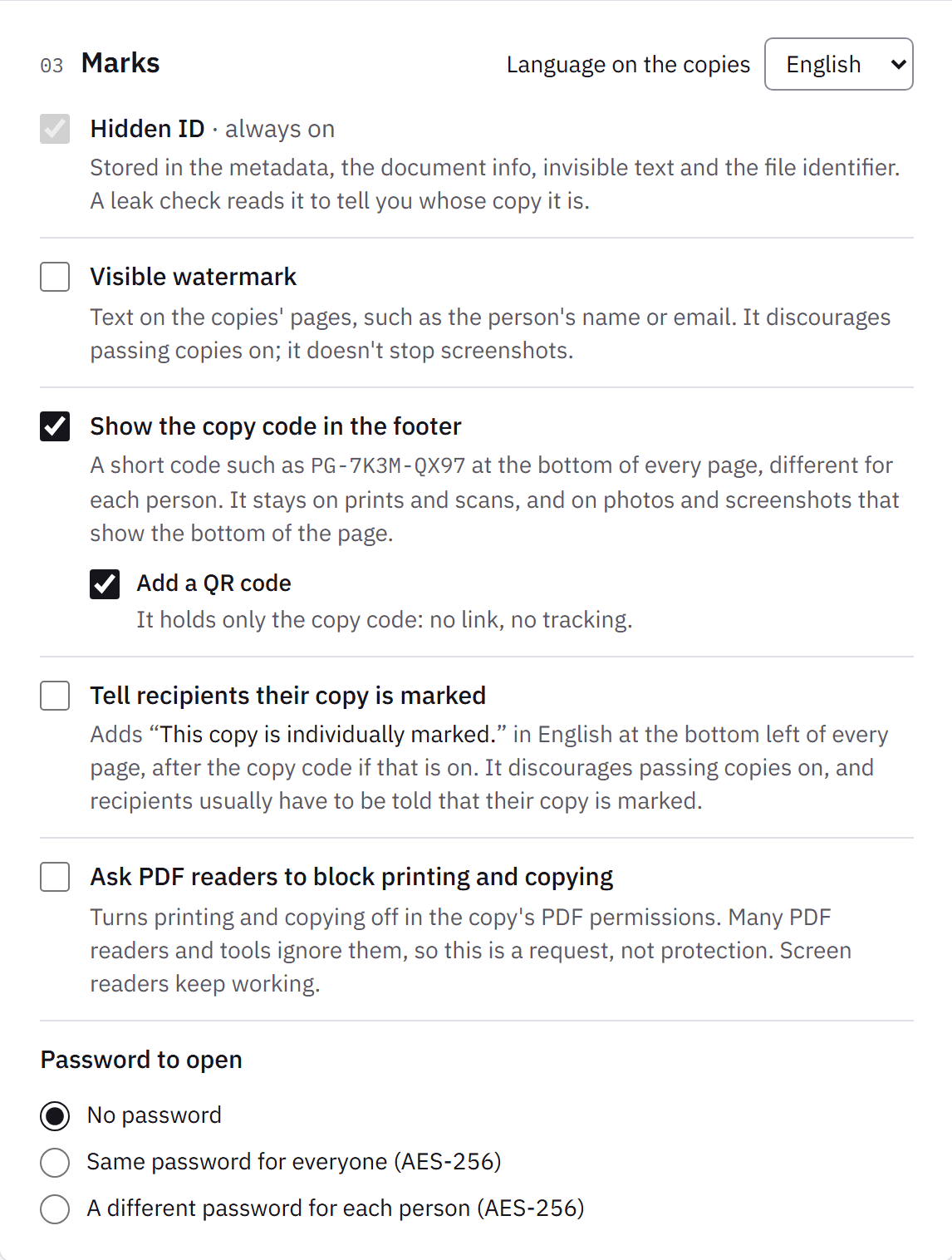
PDF Ghost puts a hidden ID in every copy, stored in four places in the file. It stays as long as the file itself is passed on, and printing, a screenshot or rebuilding the PDF in another app removes it. For pages that may be printed or photographed, switch on Show the copy code in the footer and Add a QR code: the code is printed at the bottom left of every page, where a photo or scan can still show it. For exam papers and other printed documents, see how to stop exam paper leaks.
When a copy turns up somewhere, a leak check reads the ID or the code and says whose copy it is: Found a leaked PDF? Find out whose copy it was walks through it.
Rights management controls the file after you send it
Rights-management systems and virtual data rooms keep the document under their control: readers open it through the system, so depending on the product you can take access back, set an expiry date or see who opened it. The cost is friction: readers usually need the system's app or a sign-in, and a photo of the screen still captures the page.
Combine two or three methods
Tell your recipients that their copy is marked. It discourages passing it on, and data protection law often requires it. Tell recipients their copy is marked prints "This copy is individually marked." on every page. See privacy best practices.
What none of these methods can stop
- A person who can read the document can photograph the screen or retype the text. Without the copy code in the picture, that copy can't be traced.
- A password protects only until it is shared. Once a recipient has it, the file can be opened and saved without it.
- A hidden ID isn't secret: someone who knows where to look can find it and remove it.
- A visible watermark or a copy code can be cropped out of a photo.
- Per-person marks tell you whose copy it was, not who shared it: a copy can be forwarded from someone's inbox without their knowledge.
To start, the first job guide shows each option on Protect a PDF.
Tags
- pdf-protection
- pdf-encryption
- password
- watermarking
- pdf-fingerprinting
- pdf-security
- leak-prevention