BlogGuide
Found a leaked PDF? Find out whose copy it was
Who shared your PDF? What a leaked file can tell you, and how per-person copies and a leak check name the copy it came from.
- Author
- PDF Ghost Team
- Updated
- First published
- Reading time
- 6 min
On this page6 sections
If you found a leaked copy of your PDF, the file can tell you whose copy it is only if every person got a different copy. When everyone received the same file, the leaked one looks like all the others, and you are left with clues: the file's properties, where it turned up, and who opened it in your sharing tool. When each person got their own marked copy, a leak check reads the mark and names the person the copy was made for. That tells you whose copy it was, not who shared it.
This guide covers both cases.
Keep the file exactly as you found it
Before you look for the source, save what you have.
- Download the leaked file itself, not a link to it. Don't open it in an editor and save it again: that can change its properties and drop marks.
- Write down where and when you found it: the site, chat or inbox, the date and time, and who pointed you to it.
- If you only have a photo or a screenshot, save the largest version you can get. A small, compressed copy loses detail. An iPhone photo in HEIC format has to be exported as JPEG before a leak check can read it.
- Note who received the document from you, and when.
When everyone got the same file, look at these clues
Without a per-person mark, nothing inside the file says whose copy it is. These clues can narrow the list down, but none of them names a person.
- The file's properties. In Acrobat Reader, File → Properties shows the author, the app that made the file, the PDF producer and the created and modified dates (Adobe's help page). A modified date after you sent it, or a different producer, can mean someone re-saved it, perhaps with another app. These fields are easy to edit, so an empty or odd one proves nothing.
- Is it your file, byte for byte? Compare its size, or better its SHA-256 hash, with the file you sent. If they are identical, the file tells you nothing more. If it differs, the changes may hint at the tool or the person who handled it.
- Where it turned up. A post in a group with only some of your recipients in it narrows the list.
- Your sharing tool's activity log. If the tool you shared it with keeps one, it shows who opened or downloaded the file, and when. That tells you who could have shared it, not who did.
If these clues don't settle it, this leak can't be traced from the file. For the next document, give each person their own marked copy (see how to protect a PDF before you share it).
When each person got their own copy, a leak check names it
If you sent the document with PDF Ghost, each person's copy carries a hidden ID. If you also switched on Show the copy code in the footer under Marks on Protect a PDF, a copy code is printed at the bottom left of every page. A leak check reads them.
- Open Leak checks and drop the file under Check files. A PDF, or a photo, screenshot or scan of a page (PNG, JPEG, WebP or TIFF) works.
- If the PDF is protected with a password, enter its owner password. The page shows the cost before anything runs. A PDF costs its size in MB, rounded up, times its pages; an image costs its size in MB, rounded up.
- Click Check now. Most checks take under a minute.
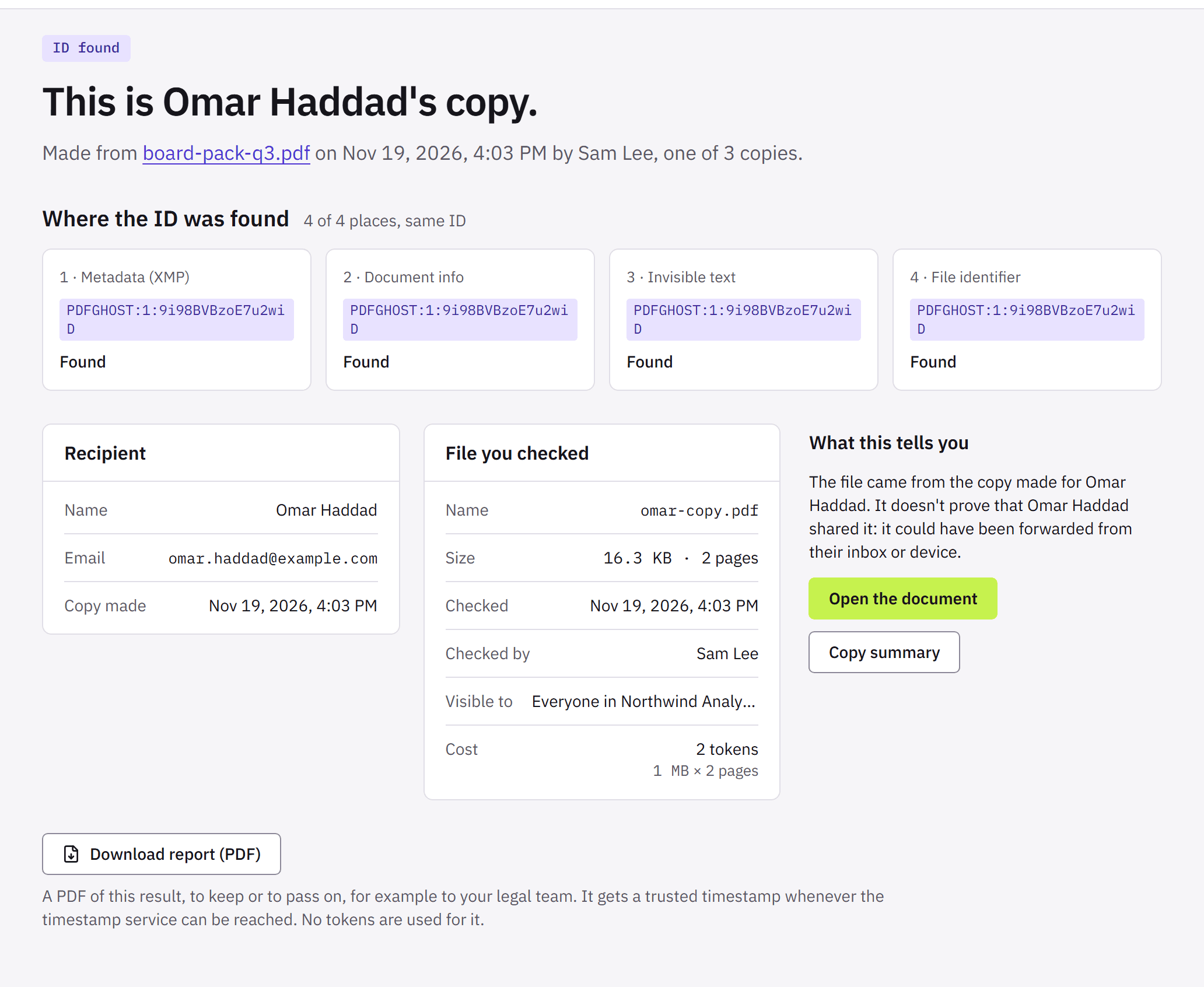
In a PDF, the check looks for the hidden ID in four places: the metadata (XMP), the document info, invisible text and the file identifier. The result says in how many it was found; an ID removed from one place is still found in the others.
A photo or screenshot works if the copy code is in it
A printout, a scan, a screenshot or a photo of a page doesn't carry the hidden ID, because the ID lives inside the PDF file. The copy code does: it is printed on the page, at the bottom left, and with Add a QR code a small QR code next to it holds the same code.

A leak check of an image reads the code from the QR code, or from the printed code with text recognition. Each code has a check character, so a misread code is almost always rejected instead of matching another person's copy.
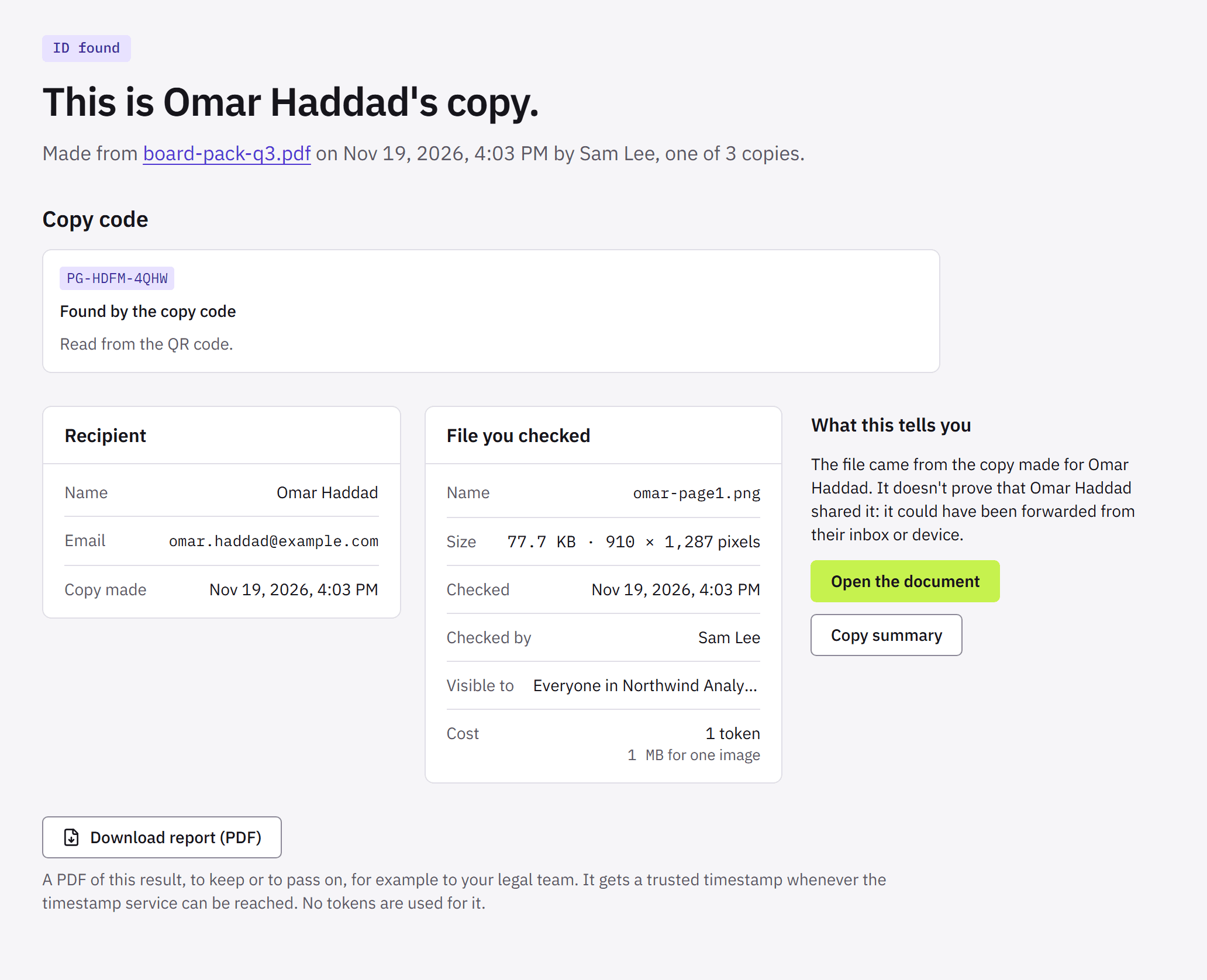
For a photo to work, the whole bottom-left corner has to be in it, sharp and taken straight on. The QR code makes photos and scans much more reliable than the printed code alone.
What to do with a match
A match tells you whose copy the file came from. It doesn't tell you who shared it: the copy could have been forwarded from that person's inbox, taken from a shared device, or passed on by someone they trusted.
- Download report (PDF) on the result saves the answer with the checked file's SHA-256 and a trusted timestamp, so you can show later what you checked and when. If the timestamp service can't be reached, the report says so; download it again later to get one. The report is a technical record, not a legal opinion.
- Talk to the person privately before you draw conclusions, and ask who else could reach their copy.
- If the leak may become a legal matter, involve your lawyer early.
- Each marked copy is linked to the person who received it, and data protection law, for example Articles 13 and 14 of the GDPR, often requires telling recipients. See privacy best practices. This isn't legal advice.
The leak check help page explains every part of the result.
What a leak check can't do
- It can't trace a copy that wasn't marked. Copies sent before you used per-person marks look the same as everyone else's.
- Some changes remove the hidden ID. Printing and scanning, a screenshot, or rebuilding the PDF in another app remove it; so does retyping the text.
- The hidden ID isn't secret. Acrobat lists it under the custom document properties, and a text search finds it. Someone who knows what to look for can remove it.
- A photo needs the copy code in the picture. A crop without the bottom-left corner, a blurred photo or a copy made without the copy code can't be traced.
- No match doesn't prove the file isn't yours. It can also mean the marks were removed or the code was unreadable.
For exam papers and other documents that end up printed, see how schools stop exam paper leaks.
Tags
- leak-detection
- leak-check
- document-tracking
- fingerprinting
- pdf-security