BlogGuide
Who created this PDF? What the file can and can't tell you
Author, app, dates, file IDs and earlier versions: what a PDF records about who made and changed it, how far to trust it, and what it doesn't record.
- Author
- PDF Ghost Team
- Published
- Reading time
- 9 min
On this page8 sections
- A PDF keeps its author and dates in two places
- The Author field is copied from the app's settings
- An edited PDF can still contain the version before the edit
- Nothing in the file records who opened it
- An open password leaves page count, fonts and sometimes the author readable
- Clean a PDF by writing it out in full, then check it
- Metadata can't tell you whose copy leaked
- What file metadata can't do
A PDF can tell you which program made it, often an author name, when it was created and last changed, and sometimes what it looked like before the last edit. It can't tell you who opened it, who saved a copy or who forwarded it: opening a PDF doesn't change the file. And every field that names a person can be typed in by anyone, so treat it as a lead to check.
This guide is based on the PDF specification, ISO 32000-1, and on our own tests with made-up files, run on 20 November 2026 with PyMuPDF 2.1 (MuPDF 1.28) and pikepdf 10.18 (qpdf 12.4). Other apps write files differently, so test the ones you use.
A PDF keeps its author and dates in two places
Many PDFs carry two sets of document facts.
- The document info dictionary (ISO 32000-1, section 14.3.3) has the fields Title, Author, Subject and Keywords, Creator (the app the original was written in), Producer (the app that turned it into a PDF), and CreationDate and ModDate.
- The XMP metadata (section 14.3.2) is an XML block with the same facts and often more. It can hold a document ID shared by all versions, an instance ID that changes each time the file is saved, and a history of actions such as "created", "converted" and "saved", each with the software and the time (XMP specification, part 2). That history records "high-level actions", not every change.
In PDF 2.0, every document info entry except the two dates is deprecated (Library of Congress format description). Many files still carry both copies, and the two can disagree. In our test, clearing the author from the document info left the name in the XMP, where a metadata viewer still showed it.
To see both copies, run ExifTool with exiftool -a -G1 file.pdf: -G1 labels each line with where it came from, PDF for the document info and XMP-dc, XMP-xmp or XMP-xmpMM for the XMP. In Acrobat Reader, File → Properties shows the document info (Adobe).
The Author field is copied from the app's settings
Nothing measures who wrote the text. Word sets the Author from the User name in Word's options, and its PDF export includes the document properties when Document properties is selected (Microsoft: author name, Microsoft: save as PDF). So the field holds whatever user name was set in the app, which may not be the person who wrote the document.
Creator and Producer name the software chain, for example a word processor and the engine that converted its output, sometimes with the operating system and its version. A 2021 study of 39,664 PDFs published by 75 security agencies in 47 countries found that 33 % revealed the person who created the file, 76 % named the producer software and 42 % the operating system (Adhatarao and Lauradoux, ACM IH&MMSec 2021). Only 7 of the agencies cleaned some of their files, and 65 % of those cleaned files still held sensitive information.
A digital signature is the only part bound to a key. Its certificate names the signer, and the signature covers a fixed range of the file's bytes, so changing those bytes breaks it (section 12.8.1). Later changes can still be appended after the signed range. Whether the signer's name can be trusted depends on who issued the certificate, and it tells you who signed, not who wrote the text.
An edited PDF can still contain the version before the edit
The PDF format lets an app save changes by appending them to the end of the file, "leaving its original contents intact" (section 7.5.6, incremental updates). A viewer shows the newest copy of each object, so the edit looks complete. The old objects are still in the file, and each saved version ends with its own %%EOF marker. Incremental saves are fast, and a signed PDF depends on them: each signature is added as an incremental update, so the document as it was at signing can be recreated (section 12.8.1).
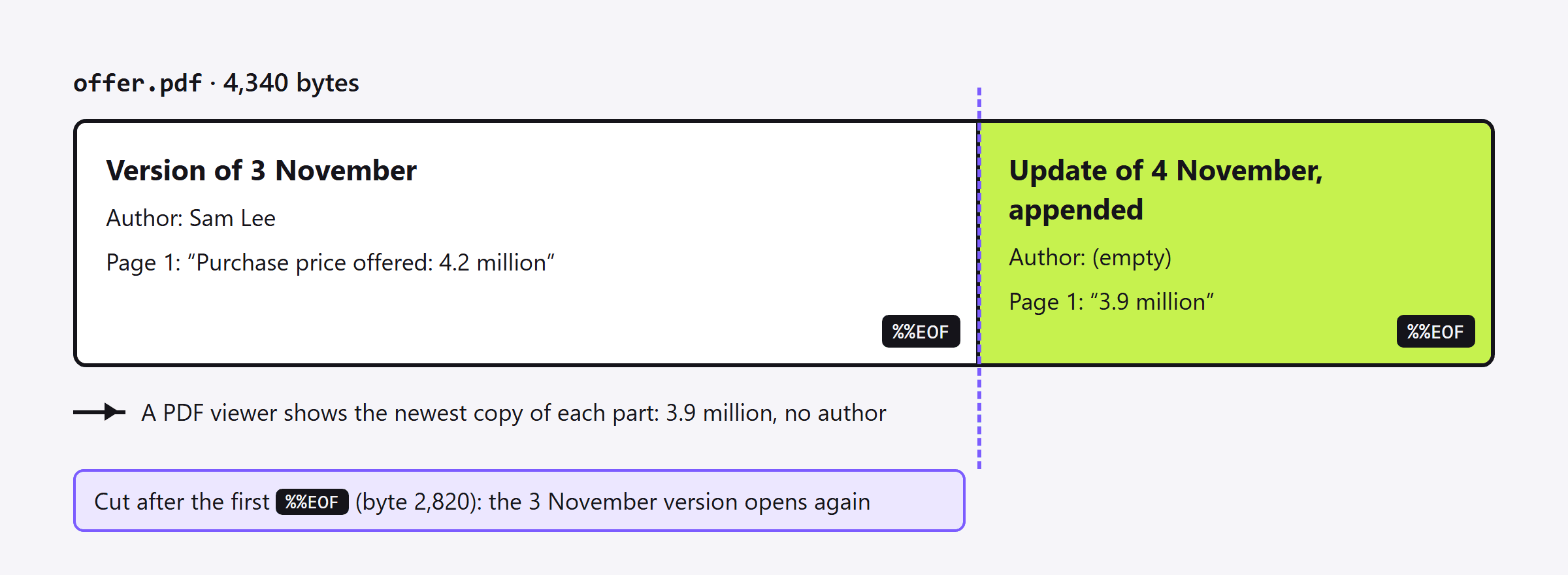
We ran exactly this with a made-up file. When we also removed the metadata and wrote the file out in full instead, it had one %%EOF marker, and neither the old price nor "Sam Lee" was anywhere in it.
These hints suggest that a PDF was changed after it was made. They are hints, not tests:
- More than one
%%EOFmarker. A file optimized for fast web view (linearized) has two without any edit: a linearized copy of our test file did. - ModDate later than CreationDate, or more than one entry in the XMP history.
- The two halves of the file ID differ. The specification sets both to the same value when a file is first written and changes only the second half on an incremental update (section 14.4). Not every app follows this: our unedited test file already had two different halves. Comparing the ID with another copy of the same document tells you more.
None of these hints can show that a file wasn't changed. A file written out in full has one marker, and its dates are whatever the clock of the computer that wrote it said, unless a timestamp authority signed the time (RFC 3161).
Nothing in the file records who opened it
The document info dictionary has no field for readers, and opening a PDF only reads it. A record of who opened a file exists only outside it, where it is stored, sent or viewed:
- A Windows file server logs access to a file only if auditing was set up on that file or folder beforehand: "Audit events are generated only for objects that have configured system access control lists" (Microsoft: Audit File System, event 4663).
- SharePoint and OneDrive record "Accessed file" and "Downloaded file" in the Microsoft 365 audit log (Microsoft Purview).
- Services that show who viewed a document usually keep it on their own server and log each view there.
These records name the account that opened or downloaded the stored file. They don't show what happened to a copy after it was downloaded or attached to an email.
A PDF can try to contact a server when it opens, through a script, a link or a form. Acrobat and Reader can warn "whenever a document tries to access the Internet" and let you block it (Adobe security guide), so a file that "reports back" is unreliable.
An open password leaves page count, fonts and sometimes the author readable
An open password encrypts "all strings and streams" in the file: the text, the images and the document info. Numbers, names and the file's structure stay readable, and so does the file ID (section 7.6.1). We locked our test file with 256-bit AES and looked at it without the password:
| Our test file, AES-256 | Readable without the password |
|---|---|
| Saved without object streams | page count (3), page size, font name (Helvetica) |
| Saved with object streams | none of these |
XMP left unencrypted (EncryptMetadata false) | from the XMP, the author "Sam Lee" and the app name; plus page count, page size and font |
| Permissions password only, no open password | everything: the file opens without asking |
The page text stayed unreadable in the three files with an open password. Encryption from PDF 1.5 on has a setting, EncryptMetadata, that lets the writer leave the XMP unencrypted so that tools without the password can still read it; by default it is encrypted (section 7.6.3). A file with only a permissions password, the kind that blocks printing or copying, opens without a password, so its metadata is there for anyone. How to protect a PDF compares what each kind of password stops.
Clean a PDF by writing it out in full, then check it
Removing the author and title is not enough if the change is appended, because the old values stay in the earlier version. Clean a file in this order:
- Remove the document info and the XMP.
- Write the result out in full as a new file, for example with
qpdf in.pdf out.pdf, instead of saving over the old one. In our test, only this removed the old values. - Check the new file:
exiftool -a -G1should list no names you didn't expect, and there should be one%%EOFmarker, or two if the file is linearized.
ExifTool's own edits are appended: its documentation says they are reversible, that "old information is never actually deleted from the file", and suggests qpdf to rewrite it (ExifTool). In the 2021 study, the researchers recovered the original metadata from all 1,237 files in their set that had been cleaned with ExifTool.
Names also sit outside the metadata: in comments, where each one carries a name for the person who added it (section 12.5.6.2), in form fields, attachments and bookmarks, and in the page text itself. Acrobat Pro's sanitize function removes "information that is not visible in the file, such as comments, metadata, or hidden layers" and saves the result to a new file (Adobe).
Metadata can't tell you whose copy leaked
If you sent one file to everyone and it turns up where it shouldn't, its metadata is the same in every copy, so nothing in it says whose copy this was.
To tell copies apart, each recipient needs a different one. A hidden ID from Protect a PDF in PDF Ghost sits in the places this guide describes, the XMP, the document info and the file ID, plus invisible text. A metadata cleaner removes it from the places it cleans, and rebuilding the PDF in another app can remove it everywhere; a copy code printed on the page, if you turn it on, still shows in screenshots and photos. A match tells you whose copy it was, not who shared it. Found a leaked PDF? walks through tracing a copy, and the leak check help page lists where it looks.
What file metadata can't do
- It can't show edits once the file has been written out in full. Finding one version doesn't mean there was only one.
- It can't date a file reliably without a trusted timestamp. A computer's clock can be set to anything.
- It can't show what a reader did with the file: copying the text, printing it or taking a photo of the screen leaves no trace in the file.
If a file may become evidence, keep the original untouched, record its SHA-256 hash, and let a forensic examiner work on a copy. This isn't legal advice.
Tags
- pdf-metadata
- document-properties
- xmp
- incremental-updates
- digital-forensics
- pdf-passwords
- metadata-removal